
Confirmation of Payee
Check the details before you pay.
Confirmation of Payee is a service that helps you check whether the account name and account number you've entered match the account you're paying.
It gives you more confidence you're paying the right person, or business and helps reduce the risk of payment mistakes and scams.
Important: Confirmation of Payee is an extra check only. It does not guarantee a payment is safe, so you should always take a moment to check the details and make sure you trust who you're paying.
How it works
When you make a payment to someone new in Online Banking, or the Mobile Banking App:
- Enter the payee details. You'll need to enter the account holder name and account number.
- We check the details. Confirmation of Payee compares the name and account number you entered with the receiving bank's records.
- You receive a result. You'll see a message to help you decide whether to continue, change the details, or stop the payment.
You can usually still proceed with the payment, but the result is there to help you make a safe decision.
What this means for you
- When paying someone new, always use their full account name (not a nickname or initials)
- If someone is paying you, make sure you share your correct account name and number
- Take your time- a few extra seconds can help prevent mistakes
What the results mean
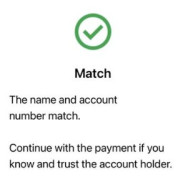 Match
Match
The name and account number match the bank's records.
- This gives you more confidence the details are correct
- It does not guarantee the payment is safe or that the payee is legitimate
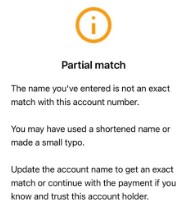 Partial Match
The name is similar but not an exact match.
This can happen if:
- There's a small typo
- A shortened or preferred name is used
- The formatting is slightly different
If you see this result, double check the details with the payee before continuing.
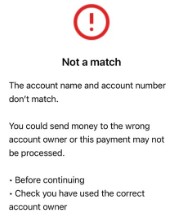 No Match
The name and account number do not match.
This could mean:
- The account number is wrong
- The name is incorrect
- You may not be paying the intended person
Stop and confirm the details before proceeding.
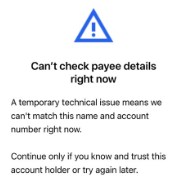 Can't check account details
We're unable to confirm the account details.
This may happen if:
- The other bank doesn't support the service
- The account can't be checked
Only continue if you're confident the details are correct.
Can't check right now
A temporary issue means we can't complete the check.
Try again later where possible. If you proceed, make sure you trust the payee.
Account may not exist
The account number couldn't be confirmed.
Double check the number carefully before proceeding.
Need help?
If you're unsure about a payment or think something isn't right, stop and check the details before continuing.
If you believe you're made a payment in error or may be dealing with a scam, contact us as soon as possible.