Google Pay

Introducing Google Pay™

Google Pay is the fast, simple way to pay at millions of places using your Android device.

  • Tap to pay:  Simply tap your Android device and follow the prompts, anywhere contactless payments are accepted.
  • Pay on apps & websites:  Make purchases online with the simple press of a button. Just choose Google Pay at checkout within your favourite apps and sites.
  • Encrypted and secured by Google: Google Pay doesn't share your card details, so your payment information stays safe.

Where to use Google Pay

Google Pay is accepted at stores, apps, and websites around the world. You can use it anywhere that you see these symbols:

In store payments

  1. Simply wake up your phone. No need to open the app.
  2. Hold the back of your device near the contactless terminal and wait for the blue checkmark.

Website or in-app payments

  1. At the checkout, simply select the Google Pay purchase button.
  2. Before confirming your order, you might be asked to pick a payment method and enter your shipping address.

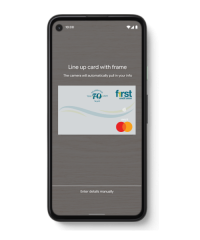
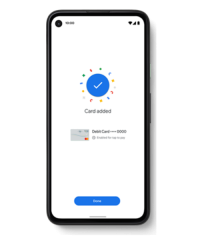
  • Set up Google Pay on your Android device in a few easy steps:

    Step 1

    Download the Google Pay app from Google Play.

    Or check to see if it’s already installed on your phone.

    Step 2

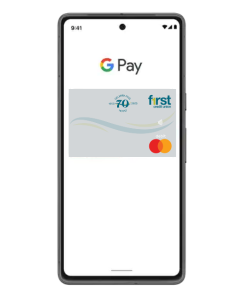
    Follow the instructions to add your First Credit Union Debit Card.

    Step 3

    That's it! You're ready to start paying with your phone.

    Prefer to do things on desktop? Get set up at pay.google.com

  • Any Android smartphones and tablets running Android Lollipop 5.0 or above. To make contactless payments, your phone also needs to support NFC (Near Field Communication). To check for NFC, look for it in your phone’s Settings app. 

    For additional information, please visit the Google Pay website.

  • When paying in-store:
    1. First check that contactless payments are accepted. Then just wake up your Android phone and hold it near the payment terminal until you see a blue checkmark. You don’t even need to open the app.

    After three transactions without unlocking your device you will need to unlock your device for the next transaction. 

    When paying within apps:
    At checkout, simply select the Google Pay purchase button. You won’t need to enter your payment info. 

  • Google Pay protects your payment info with multiple layers of security, using one of the world’s most advanced security infrastructures to help keep your information safe.